I attended RUGIE last night. It is a Local User Group for Revit users in the city of Rancho Cucamonga in Southern California. It was well attended with about 20-25 people showing up. It was only the second meeting they have convened. It is hosted by Scott Davis (Revit Tips and Tricks Manager for AUGI) at WLC Architects.
Daniel Hebert of L.A. CAD (a reseller) presented Revit Structure and then a local Structural Engineering CAD Manager, Tom Weir, displayed some of the work that he has been doing with the tool. He actually started using Revit Building for structural design and was on the advanced Beta Team for Structures.
He has quite a few outstanding projects in Revit. A gymnasium, a church, a school trade technology building and finally – The Rose Bowl. Yes – that Rose Bowl. He has model a great deal of the Rose Bowl structure in Revit tools. His firm is documenting and enhancing the structure and he uses Revit for his structural design work.
Another interesting item of note: There was a High School Junior visiting the user group from Santiago High School in Corona, CA. Jordan Hildebrandt – He uses Revit at school. Bill Brown, his teacher, has high school curriculum that includes Architectural Desktop and Revit. There should be more schools like this!

Happy Father’s Day to all the men out there who are trying their hardest to be a good dad, and show the next generation what it means to be a leader.
And the biggest thanks to my Dad. For showing me what it means to be a man of integrity, generosity and fun loving. I appreciate every time you made a corrective comment about how I should be living life as I grew up. I appreciate your love and generosity that is now being passed on to the next generation (your grandkids) and how you continue to impact us all.
Thanks Dad!
Autodesk Architectural Desktop 2006 adds several tabs to the standard AutoCAD 2006 Options dialog box. We are still looking at these options beginning with the AEC Editor Tab. It is located all the way to the right

The Export to AutoCAD section lets you how you want XREF to react when you are sending your file out to AutoCAD. Make sure you use this function now that it is available. You no longer want to try to Save As to get your file out to others.
I have been up in San Rafael for the past three days at the AUGI Board of Directors meeting. While there I attemped to post to my blog from the “unsecured” wireless network at the hotel.
If you saw some strange posts on my blog about San Diego – sorry. That was not me. I apparently had my post hijacked somehow and replaced with some wierd posts.
Again, I appologize and admit that my zeal for blogging may have led to some strange looking posts.
The Management… :>)
Last time I talked about what could be categorized as personal reasons that Good CAD Matters, now I move on the corporate reasons.
1. Good CAD matters because we share files with other Users and Firms. If you give or get files from others, this is a no brainer kind of comment. You have seen what it means to have good CAD files in and out. If you are sharing internally with other designers, then you find out directly from them that good CAD matters. If you are sharing files with outsiders, you may not be hearing from them. But either way – you are developing a reputation on your CAD abilities. Is that reputation a good one?
2. Good CAD matters because your clients deserve the best. Your firm is getting paid for good design. That is the bottom line. But you are also most likely giving them CAD files as an instrument of service. These files are a reflection of your design ability. Have you ever been in a meeting and had a client comment “if they can’t get the CAD files right, what can we expect about the design?”
3. Good CAD matters because your files are shared with others that you don’t know about. Often your files are taken by the client and given to others. Your reputation is spreading.
4. Good CAD matters because it increases productivity. Face it – a good CAD file is a pleasure to work on. With corporate teams working on several files and exchanging data between projects, any flaw will be multiplied and cascade over several projects. If your files are tuned and refined for production, then you are saving time and making money.
5. Good CAD matters because you pay for it. All of the users in your firm are paid to be productive, creative and fast. Good CAD files help in all of these areas.
6. Good CAD matters because it lets you automate. By expecting and knowing where objects are created, located and defined, you can automate all kind of things. Xref attachment and manipulation, Layer edits, Insertions, Title Blocks, Tables, Layouts, etc. The list is endless. But you have to depend upon things being named, placed and created as you expect them to be.
Got any more GOOD reasons?
In one of my favorite movies (Oh Brother , where art thou?) Delmar O’Donnell says “Come on in boys, the water is fine.”
Autodesk products can seem daunting, complicated and intimidating. I become concerned at times in this blog about the not so rapid pace of tool adoption and it is troubling at times.
BUT, if you are just beginning with the software, Autodesk programs have produced a large following of users that are dedicated to sharing their skills. User groups are unique to the software world. I did a search on Google for “user group” and found 8,690,000 results. Yahoo has 5,230,000 results. I started looking at them and found that the term is virtually limited to technology groups alone. Software, hardware, OS, programming languages, and more. There was no Tiddlywinks User Group. No NASCAR Racer User Group. Not even a Barbecue Users Group. Technology Only. Hmmmm.
If you are a newcomer to the tools, don’t give up.
Here is some advice for those just starting out…
- Focus on the main tools that you need.
- Don’t let what you don’t know stop you from using what you do know.
- Ask dumb questions – cause there is no such thing as a dumb question.
- Take notes
- Refer to your notes – often
- Read the Help files – they actually help
- Join a use group in your area
- Join AUGI – It’s free and it is full of high tech folks to answer your questions
- Get close to your reseller – they sold you the software and they are a great resource.
- Don’t give up
- Ask folks to clarify jargon, if you don’t understand
- Don’t expect to know it all in a few weeks
- Don’t expect to know it all – ever
- Don’t stop learning
- Seek out others who have used the tools longer than you
- Don’t be afraid to admit you do not know
- Don’t be discouraged if you are confused – the light will eventually come on
- Borrow from others – use their files as examples (hopefully they will be good)
- Experiment – it won’t break (but do it on files that are not project critical)
- Have Fun and don’t sweat it – we all started out on the same level – we all knew nothing at one time.
So – the AutoCAD water truly is fine (notice I did not say “perfect”) – come on in, join the club, we will help!
Soon you will be saying like Delmar,”ok…I’m with you fellers!”
Many times I have asked myself “Why do I care so much about getting CAD done right?” “Does good CAD really matter?”
Here is what I tell myself when I answer back…
1. I care because CAD Drafting matters. It matters to your bosses and your firm. They are counting on getting the job out the door and being productive. It use to matter how well I could spin a mechanical pencil so I would maintain the width of my lines when I was drafting (I am dating myself). It use to matter what my hand lettering looked like. I use to matter that I knew how to combine my triangles to get the right angle. I use to matter how I used my French curves. Now it matters how I define my layer names and pen tables. It matters how I set up a file so others can work with me. It matters how I divide my files up and create references. It matters because others need to share my workload.
2. I care because CAD Design matters. It is imperative that I get my designs out of my head and into the machine correctly. So others can know what I visualize. So I can take my ideas and make them reality. The chosen tool today is CAD and BIM.
3. I care because CAD Models matter. BIM is here and it is here to stay. If you have not worked on a complete BIM model no matter what tool you use, then you are not getting a good feel for the future. File based CAD is soon to be a thing of the past. Oh sure we will have hold outs and 2D Drafting based tools (like AutoCAD) will be here for a long time, but this is the dawn of a new perspective on design tools.
4. I care because I am a craftsman. I take pride in what I do. I like to know that when others look at my product, I can rest assured that it will stand up to review. I have seen a lot of weird and strange CAD files. I strive to not let mine be counted among them.
5. I care because I am paid to care. My company has invested time and money in my education and training. They expect me to produce and manage well. I do not want to let them down.
6. I care because I love this stuff. Sound strange? Not to most of you, I hope. You love it also. You like new tools. You like technology. You like learning. You like sharing your knowledge.
More to come…
Add a comment of your own…
Moving Day – Avoiding the potholes
- Move a small team or project
- Let everyone know you are moving ahead. Keep everyone in the loop as to when the change will take place and how you are going to do it.
- Keep management informed. Let them know that the projects they oversee will be making a change.
- Get your vendor on board. Keep them informed as to when you are making changes. They may be getting more support calls than usual.
- Make small milestones
- Convert drawings as needed or do wholesale translations to the new release.
- Set markers out in front of you – like getting all of the drawings moved.
- Checking in with the users
- Stay close to the first users who move. Check in with them and stay close so you are there to answer questions and give support. Don’t make them have to hunt you down.
- Daily and weekly check in. Do a daily walk around among the users. Look over their shoulders, check the workflow.
- Meetings for Migratory workers. Gather them together for lunch at the end of the week to debrief and instruct and just to keep the moral up.
- Don’t forget that they still need to use the old software
- Working in a mixed house can be tough, but the reality is that most of us are doing it. You may have different versions or different platforms. The real world means you need to keep up with everything. This job can be tough but it is doable.
- Working in a mixed house can be tough, but the reality is that most of us are doing it. You may have different versions or different platforms. The real world means you need to keep up with everything. This job can be tough but it is doable.
- Use the tools that Autodesk provides for migrating old data
- Migration tools imbedded into AutoCAD 2006 help you move your files. They are not fool proof, but they are a very good start.
- File compatibility may be an issue. Make sure that you have spoken to the client and your subs about the move. They will be getting different files now.
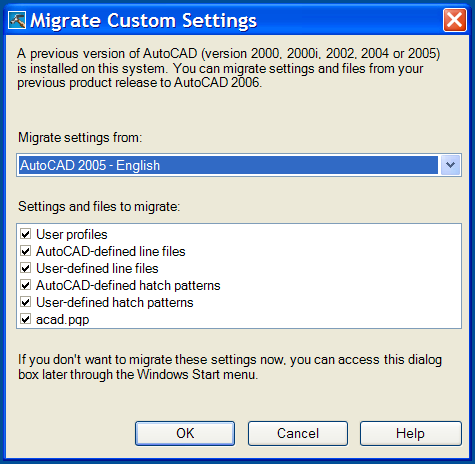
Getting the most from your old data
- Move only the stuff you need
- Make a gallant attempt to define the needed items. Migrate these items before the users need them. Test them out and make sure they work.
- Move your LISP files, but only if there is no tool in the new release that replaces it.
- Update your MNU files to CUI files. Read as much as you can about this move. CUI interface and creation is very different from MNU. You need to know how to create them, maintain them and deploy them to all your users.
- Move more data when you need it
- Keep in touch with the users to see what they are missing. If they need some old data – go get it and provide it. Don’t make them search for it. They are to focus on design and production. You are there to support them.
- Listen for what the complaints are and try to alleviate them quickly. Users who have troubles can really impact others in a negative way and soon everyone may be complaining.
What to leave behind
- Old habits
- Don’t use the new software like you used the old software. Many times we approach the use of a new piece of software the same way we use the old one. We never really take advantage of the new improvements. When moving to a new release, find out what is in there and how you can apply it to your office. Make a list of the ones you want to use and then add them to your arsenal one item at a time. Don’t move to the next tool until the one you added is embedded in to your process.
- Don’t use the new software like you used the old software. Many times we approach the use of a new piece of software the same way we use the old one. We never really take advantage of the new improvements. When moving to a new release, find out what is in there and how you can apply it to your office. Make a list of the ones you want to use and then add them to your arsenal one item at a time. Don’t move to the next tool until the one you added is embedded in to your process.
- Old customization
- If it is part of AutoCAD now, quit using the old stuff. Move to the new CUI. Use the latest Express Tools. Jettison your old tools if AutoCAD is now doing it for you.
- If it is part of AutoCAD now, quit using the old stuff. Move to the new CUI. Use the latest Express Tools. Jettison your old tools if AutoCAD is now doing it for you.
- Old complaints
- Don’t underestimate the software. Don’t confine it to the last versions impressions. If your users have seen a demo from two years ago and have not really looked at the tool since then, they are out of touch. They may be imposing two year old impressions on the new software. And they bring up old complaints that are no longer valid.
- Don’t underestimate the software. Don’t confine it to the last versions impressions. If your users have seen a demo from two years ago and have not really looked at the tool since then, they are out of touch. They may be imposing two year old impressions on the new software. And they bring up old complaints that are no longer valid.
- Old Junk
- Files are not in the correct directories. Now is the time to clean up. Get things in order and make the changes that you have wanted to for so long.
- Duplicated files that are located all over your network. Keep the new set up clean. Do not just copy everything over and thereby carry on with old problems.
- Key files that are located on users’ C-drives. Keep system files on the server. If there are CTB’s or STB’s on local users machines, move them to the server. Clean these files off the local machines. Nothing is harder than trying to plot or work on a file that depends upon a file that is located on someone else local drive.
Prep for the move. Make the move. Then enjoy the new software.
When to make the move
I have gotten a few comments back from readers about the decreased span of time between software versions put out by Autodesk. If you review the AUGI survey on Migration at http://www.augi.com/surveys/archive/cadmgmtsurvey-0505.pdf you will see that 67% of the respondents would agree that releases are happening too fast. Even so, a majority (54%) of users on subscription migrate as the software ships or within 3 months. Non-subscription users migrate every few years. This is a huge gap. Let’s examine some of the reasons for migrating and when it should be considered.
Timing
The timing of the move may help you to get the best results. So move when it makes sense:
Before the next project starts. This may be an opportune time to get the most impact of the upgrade to productivity. Appling the new tools to the next project may give you the boost in effectiveness needed to cushion the strain of moving.
After Training. This may be the most opportune time to make a move forward. Training should be done right before you deploy. Keeping the concepts and methods fresh in the mind of the users will help.
When demanded. Often the client or project will demand that you make a move. To get a project or contract many owners or Project Managers will agree to use a specific version of software or a tool that is only available in a newer release. You may be forced into making the change.
Where to start
Start the migration with your best users. Let them have the software earlier. Give them Beta software if need be. Let them test it out in a real world environment, but not on real project files.
You have a choice to make. Do you migrate a small team or the whole office? This would most likely be your call. Get some input from other firms that have done the migration already. I would recommend that you take this tack… The bigger the firm – the smaller the migration group. Smaller groups are easier to manage. It is easier to fix problems and learn lessons to apply to the larger group.
Line up support before you start. Get Management behind you before you make any move at all. Do not move until they understand the issues and are supporting your efforts. Don’t forget about Vendors. They have special knowledge about the tools you use. How they interact with other tools. How they interact with hardware. They have had other clients that have been down this road before. Tap into them.
What to pack and how to pack it
- Make a list of what you think you need to get the job done and check it twice. Use this list to think through the issues. Include the following:
- Your custom tools and programs
- Your blocks
- Your Standards
- Review the list for areas of concern and modifications needed. Think about what would impact the users if it is not prepared beforehand. What will they need to stay productive? What will they miss the most?
- Copy only your best guess at the files they will need. Place them in a new area for the new release. You will have a mixed house of old tools and new tools. Old files and new files. Make sure that you keep them separate. Edit the new files and test them fully. Let your best users test them. Get second opinions.
- Migrate only the needed items as they are needed. The point is to jettison the old stuff as you move forward, leaving to old files behind unless they are needed.
- Prep the machines before the move. Load and test all of the software. Keep notes of what works and what doesn’t. Remember that each user may need a differing set of software. Each blend of tools needs to be tested. Define a standard platform for the install. Create a step by step list of loading the tools. In what order? What custom configurations? What personal setting will be needed? How do you migrate the old setting?
- Prep the Users
- Training
- Your Support teams – either tech support personnel or users who can help out.
- Hand holding – don’t overestimate the users understanding of the process.
- Prep Management. Let them know that you are moving far in advance of the move itself. Keep them informed as the date approaches. Provide information about the impact. Provide updates as the progress moves ahead.
By planning well and executing with effectiveness, you can make a great move.
 Loading ...