I just attended my first AUGI Board meeting. I was impressed with the professionalism of all of the Board members and the efficiency of Yoshi Honda. The guy knows how to run a meeting.
I am also impressed with the level of dedication that the Board has to promote, protect, educate and motivate the members. AUGI members are very lucky to have a group so dedicated to it’s membership

Keyboard shortcuts are defined in the file KeyboardShortcuts.txt in the Revit folder.
You can use a text editor to modify this file and add keyboard shortcuts in format: “shortcut” menu:”menu-string”
Can I get a single line text editor for MTEXT?
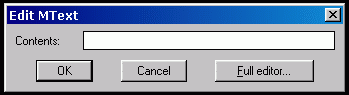
The default dialog box for MText is complex. There are some who want a simple interface for this command. There is a single line dialog box with the ability to bring up the full editor if needed. To set it up enter a new value for the system variable MTEXTED.
“:lisped” (be sure to include the “:”)
Command: MTEXTED
New value for MTEXTED, or . for none <“Internal”>: :lisped
the next time you use MTEXT you should see…
I have been elected to the AUGI Board of Directors. AUGI is the Autodesk User Group International. If you are not a member – become one. If you are a member – check out the web site.
Whatever you do – get involved.
Move or Copy with No Command Active – AutoCAD 2005
Select an entity – grips are displayed. Click on the same entity again (not on a grip), keep the left button pressed and drag your mouse to a new position. The selected entity is moved to the new location or – when you press the CTRL key – copied to the new location
New Blog for CAD Manager Issues and Ideas
Welcome to the CADD Manager.com blog.
 Loading ...