There are several other items I think should be included in your CAD file Disclaimer.
1) Electronic Shelf Life.
Include the fact that the files you deliver have a limited shelf life. In other words, the files nor the media they are delivered on will last forever. I have had many clients call and complain several years after the project was completed, that the file or the media was failing. So put a time limit on the life of the files. If they work after that time (which most of them will) then great. But the client needs to understand that, like drinking milk after the expiration date, your files also have a freshness date.
2) Acceptance period.
Put a time frame on acceptance of the files. This would mean that the files must be reviewed and accepted or rejected within a specific time frame (90 days) and you must be notified about any concerns, or they will be considered accepted and approved. Fortunately we were able to oblige them with files from our archives, but this should not be required after such a long time.
3) Software Release specific.
The software used to create the files is the software that is valid for use. Often an upgrade of files may create problems when opening a file from a previous release. I have seen dimensions mess up – big time. Not good.
4) Hardware specific.
Not as crucial as software release, but sometimes hardware is required at some level to allow the files to work. I know that the 2006 higher end products from Autodesk have higher system requirements.
So in general I would make a requirement for file use to be the exact hardware system and software version that was used to create the files and also place a time limit for acceptance and a longer term shelf life on the files.

To ensure that you protect your firm when delivering or exchanging files between you and your client or subs it is good to think through the issues that may come up as you transfer, exchange or deliver for use the files you create. (but first, my disclaimer for this article… In no way is this list intended to cover you legally. Consult your attorney.)
Disclaimers
You can find a few example disclaimer by searching Google for links. Use the links you find as examples if you have nothing to start from.
Include or address the following items in your diclaimer.
1. That you make no warranty of any kind, express or implied, with respect to the file(s)
2. That the receiver agrees to indemnify, defend and hold harmless your firm, its officers, and employees from and against any and all claims,suits, losses, damages or costs incured from using the files.
3. That if the files that are modified after received, the receiver agrees to indemnify, defend and hold harmless your firm from and against any and all claims, suits, losses, damages or costs, bla bla bla, from the use of outdated design files.
4. That the receiver assumes all risk and liability for any losses, damages, claims or expenses resulting from the use or possession of any file(s) you send them.
5. That the official Contract Documents of record are those paper, mylar, or vellum documents produced by your firm which bear the company seal and signatures.
Did I miss anything that you folks use for disclaimers? Send me – or post a copy of your disclaimer.
The newest release of Revit may tax you older machines a bit…
Minimum Requirements:
- Microsoft® Windows® XP (Professional, Home, Tablet PC Edition) or
- Microsoft® Windows® 2000 SP4 (or later)
- Intel® Pentium® 4 1.4 GHz or equivalent AMD® Athlon™ processor
- 1 GB RAM
- 1 GB free disk space
- 1024 x 768 monitor and display adapter capable of 24-bit color
- Internet connection for license registration
- Microsoft Internet Explorer 6.0
Now for the Recommended system specs for some areas:
- Microsoft® Windows® XP Professional SP2 (or later)
- Processor: Intel® Pentium® 4 2.8 GHz or equivalent AMD® Athlon™ processor
- RAM: 2 GB
- Two-button mouse with scroll wheel
Autodesk Architectural Desktop 2006 adds several tabs to the standard AutoCAD 2006 Options dialog box. We will take a look at these options beginning with the AEC Editor Tab. It is located all the way to the right after the standard Tabs. It is the first of many tabs dedicated to ADT settings.
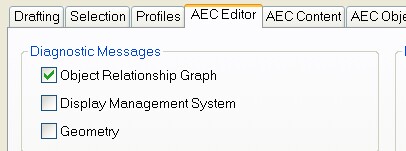
The AEC Editor settings are saved in your Windows registry.
The first area helps define when you will see diagnostic info. I would leave this area alone. No need to mess with any of these settings at this point. All diagnostic messages are turned off by default. I have one checked just to see if I see any difference in performance or interaction. You can leave yours set to off.
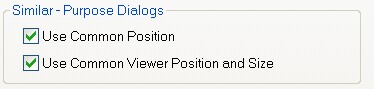
The next area is called Similar-Purpose Dialogs.
I spoke recently with a user who was quizzing me on what exactly Paper Space Layouts do. I was mildly shocked that he had no understanding about using PS and Layout tabs. He was a long time ACAD 14 user and had also used ACAD 2002 for some time.
Are there really folks out there that are not using PS Layouts? YES and there may be quite a few. I am always shocked to see the class offerings at AU and they include Lynn Allen’s “Lost in Paper Space”. This last year it was presented by Daniel Abbott of Southern Maine Community College. How long has Paper Space been around now? Almost 10 years.
Lynn’s articles include her most popular Circles & Lines columns, “Lost in Paper Space (Part 1),” (September 1996, pp. 71-74) and “Lost in Paper Space (The Sequel),” (October 1996, pp. 69-74).
Let me think… If MS/PS has taken 10 years for the stragglers to embrace, how long for things like Fields, or Dynamic Blocks. Oh, how it pains me to see that the level of the slowest adopter is so slow. Are we not a tech planet? Is this not the new millennium? Please share your stories of tech stragglers – make a comment.
John Kotter of Harvard Business School published A Force for Change: How Leadership Differs from Management. This topic fleshed out some great concepts.
Leadership is about change and movement — perceiving the need for a new focus, figuring out where the people or systems needs to go, creating strategy to get there and motivating others to make it happen.
Management is a matter of standardization and order — setting goals, defining plans and budgets, organizing and rallying qualified people, and solving problems.
Which of these would you consider your weak spot? Leaders are often derailed because they cannot organize and execute. Managers are sometimes frozen with a lack of what to do next or become slaves to responding to emergencies. But a CAD Manager has to blend them both. I have heard it said, “You can find great thinkers anywhere; it’s really hard to find the people who can get stuff done.” I have also heard “Anyone can be a manager, it takes someone special to be a leader.”
Yet management expertise is inadequate without a vision of what IT can do. Leadership is just rhetoric without a plan to succeed. CAD Managers need to figure out what the firm needs, how they can contribute and who must be involved.
So where do you sit on a scale of 1 to 10 on each scale? Are you a visionary leader that thinks planning is overrated? Are you a Manager who think wild ideas never get the project out the door? You need to be some blend of both.
Take honest stock in your talents and see where you need some bolstering up. Seek mentors in that area and start buying books and reading. Start watching others who have the skills you need. Make sure that you are not so focused on being one – that the other withers on the vine.
While I encourage everyone to expand their expertise as Leaders, never forget that your company most likely pays you to be a Manager, not a leader. Leadership makes your Management skills impact more areas, but if you lack management skills this impact will be negative.
Build your basic management skills first.
The May Issue of the Journal has been published.
In This Journal
Pulling in the Plotting purse strings
Tools I use…
Survey Says!
CADD Leadership – Part 7
AutoCAD Home Use
Quick Tip – Revit 8
To all of the mother’s out there – a tip of the hat.
To my mother a special expression of love and respect for putting up with me for so many years. For patiently and lovingly and supportively helping me get through the years. For all that you have done, Thank you is not enough.
Your son, Mark
Thanks to all you folks who have been tuning in…
We had 13,267 page loads from the Blog and the web site in April.
Please feel free to e-mail me with your ideas for future topics or feedback.
 Loading ...