OVERKILL
Do you have users with nasty habits?
Habits like filling in gapped lines with little pieces of lines.
Users who copy opbects in place and end up with lines on top of
lines.
You can fix it - if you have Express tools.
On the Express Tools pulldown - under Modify - It is called
"Delete duplicate objects"
From the command line it is called "Overkill"
OVERKILL will remove objects with geometry
that is redundant. For example:
- Duplicate copies of objects are deleted
- Arcs that are drawn directly over a portion of a circle
so that the arc cannot be seen will be deleted.
- Two lines drawn at the same angle so that they partially
overlap are combined to form a single line.
- Duplicate line and/or arc segments within polylines are
removed.
- Lines that share the same angle and a common endpoint.
You are asked to select the objects you want to analyse.
You get the following dialog after you have selected them.
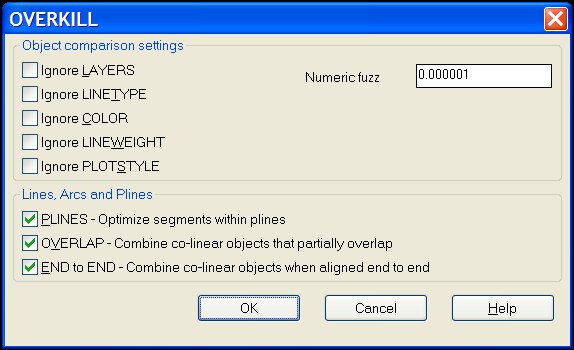
If the Comparison setting are unchecked you will lock object
searches into Layers, Linetypes, etc. So items on
differing layers will not be corrected and so on.
The Numeric fuzz factor when set large will allow for a
little slop when searching for matching or duplicating objects.
So exact matches are not required. Set this higher if your
users are not consistent with OSNAPS.
All in all, this is a fairly efficient little tool to get rid
of the annoying overlaps and duplicates in your files