- CADDManager Blog - http://www.caddmanager.com/CMB -
AutoCAD 2011 Options Dialog-Plot Publish Tab-Final Plot settings
Posted By CADDManager On 2010/04/27 @ 5:26 AM In AutoCAD,CAD Standards,The Basics | No Comments
Final look at the Plot and Publish Tab.
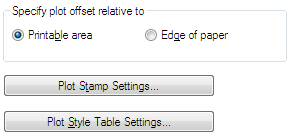
Specify Plot Offset Relative To
Specifies whether the offset of the plot area is from the lower-left corner of the printable area or from the edge of the paper (PLOTOFFSET system variable). Depending on your plotter you may have to fiddle with these setting.
Printable Area
Specifies that the plot offset is relative to the printable area.
Edge of Paper
Specifies that the plot offset is relative to the edge of the paper.
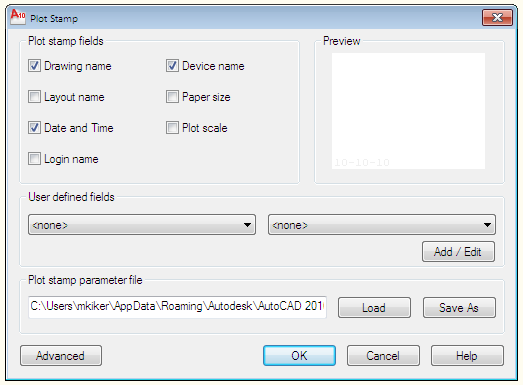
Plot Stamp Settings
Opens the Plot Stamp dialog box. So much here that it will need to be another post at some point.
NOTE: Most people don’t use this plotstamp any longer. They use RTEXT with Diesel or more recently – FIELDS.
Plot Style Table Settings
Opens the Plot Style Table Settings dialog box.
Article printed from CADDManager Blog: http://www.caddmanager.com/CMB
URL to article: http://www.caddmanager.com/CMB/2010/04/autocad-2011-options-dialog-plot-publish-tab-final-plot-settings/
URLs in this post:
[1] Image: http://www.caddmanager.com/CMB/wp-content/uploads/2010/04/Options-Print-05.png
[2] Image: http://www.caddmanager.com/CMB/wp-content/uploads/2010/04/Options-Print-05a.png
[3] Image: http://www.caddmanager.com/CMB/wp-content/uploads/2010/04/Options-Print-05b.png
[4] Image: http://www.linkwithin.com/
[5] subscribe to my RSS feed: http://www.caddmanager.com/CMB/feed/
Click here to print.
Copyright © 2009 CADDManager Blog. All rights reserved.